Contractor Production Planner · Google Sheets
A clearer plan
for your next job.
Bring your job queue, crew schedule, readiness, and weekly capacity into one working spreadsheet.
View planner on EtsyDigital download · Free Google account required
Current price and purchase terms on Etsy.
Inside the workbook
See the week.
Spot the pressure.
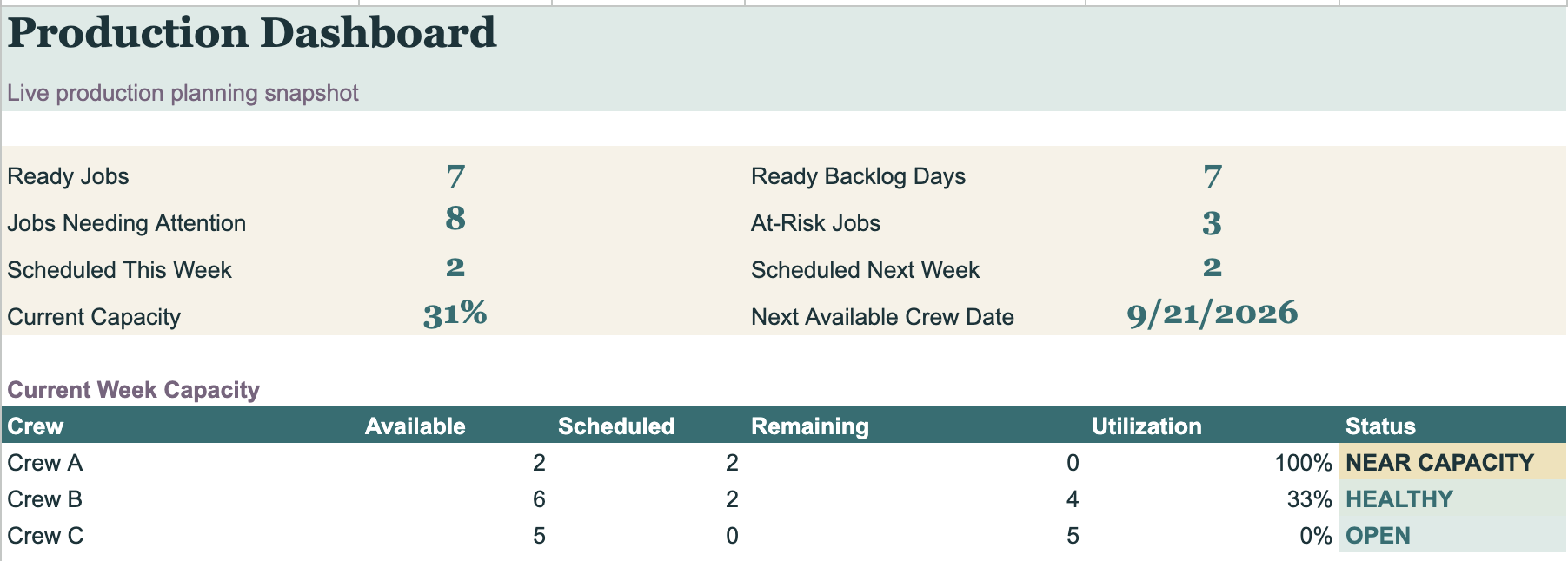
The dashboard brings job readiness, backlog, risk, and crew capacity into view. Use it to decide what needs a closer look before the team heads out.
What is included
From sold work
to a weekly plan.
Connected planning views, configurable settings, and protected calculation engines to reduce accidental formula changes.
- 01
Production queue
Keep sold, active, on-hold, and completed work in a shared planning structure.
- 02
Forecast crew schedule
See planned work by crew with forecast start and completion dates.
- 03
Weekly capacity planner
Compare available time with scheduled work at company and crew level.
- 04
Readiness & attention flags
Spot jobs that need a closer look, including readiness, risk, and scheduling conflicts.
- 05
Production dashboard & report
Review the planning picture and bring a weekly production report into your team conversation.
- 06
Settings & quick-start guide
Set up company details, crews, workdays, job types, and availability exceptions.
Made for real production work
For the person
holding the schedule.
Built for small contractors and service businesses managing multiple crews and active jobs: painters, remodelers, installers, specialty trades, and home-service teams.
Use it when the recurring questions are about what can start, where each crew is going, and how much work the business can carry.
It focuses on production planning. Check the Etsy listing against your needs if you are looking for estimating, bookkeeping, payroll, or a full customer-management system.
Getting started
Your own copy.
Your crews. Your work.
- 01 / Get access
Download the PDF
Purchase on Etsy and open the included access PDF.
- 02 / Make it yours
Create your copy
Sign in to Google and use the PDF link to save your editable planner.
- 03 / Plan the week
Add crews and jobs
Follow the guide to enter settings, availability, and your production queue. Review the resulting schedule and capacity views.
Before you buy
A few practical
details.
What do I receive?
An instant digital download through Etsy: an access PDF with the link to create your own Google Sheets planner copy and a quick-start guide. No physical product is shipped.
Do I need paid software?
A free Google account and Google Sheets are required. This product is a spreadsheet planning system, not a standalone app.
Can my team use it?
The license covers one purchasing business, including internal team use. You can customize the working copy for that business. Do not resell, redistribute, sublicense, or share the template outside your business.
Does it include the jobs shown in the preview?
The screenshot uses demonstration data to show the dashboard. Your working copy starts with blank job inputs so you can add your own work.
Will it make scheduling decisions for me?
The planner provides forecasts and planning flags based on your inputs. Keep remaining durations, readiness, availability, and commitments current, then review the plan before confirming dates with customers.
What support is included?
Access and basic setup help are included through Etsy messages. Business-specific customization, data migration, and consulting are separate services. See the listing for current pricing and purchase terms.
Put the system to work
Start with a
useful question.
Aurena Contractor Production Planner
Make the next
start-date conversation clearer.
Explore the full listing, current price, and purchase details on Etsy.
Get the planner on Etsy